
How to Make an Ali G Driving AI Video with Your Own Photo
One clear photo of an adult who agreed. The blue car, the drive, and the sound are already on the page. No prompt.
Last updated: 2026-10-30
Yes. You can be the driver. The clip is already the drive. You bring one photo.
Open it here.
 Open →
1. Open the template
The page is the driving scene. The blue car, the wheel, the street, and the sound are loaded. You do not paste a video address, and you do not describe the car in a sentence.
2. One photo
- One adult, and they agreed to appear
- A file you are allowed to use
- Face toward the camera
- Sharp enough to read the face
- Face and shoulders in frame, so the outfit shows
- Waist-up is enough
A group photo will not pick one person out of a crowd. A minor does not go in. Sunglasses and anything else covering the face make the result harder to read.
The slot is 1 · The driver.
3. Preview, price, then Generate
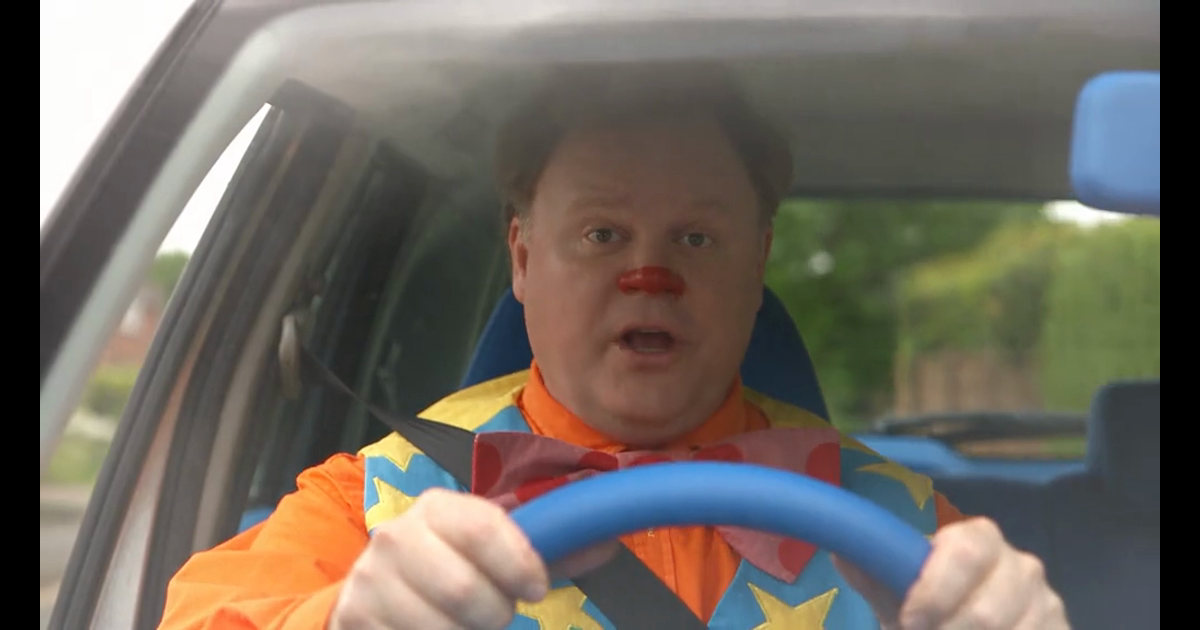
Watch the example first. Watching is free. Check that this is the drive you want: hands on the blue wheel, the glances, the street.
A finished file is widescreen, about 9 seconds, and it keeps the sound from the example. It uses 26 credits. Packs start at $9.90. Then click Generate. Leave the tab open until the download is ready.
You do not type a prompt.
What the photo changes
Hairstyle, face, and clothes come from the photo. The orange shirt, the yellow vest, the bow tie, the striped trousers, and the red nose in the example give way to that photo.
The drive does not. Hands on the wheel, the glances, the seatbelt, the blue car, the street, the camera, and the sound stay. This page does not draw a new scene from the meme. It keeps this clip and changes the driver.
Where the template lives is in where to find it. The prompt question is in making it without a prompt. What the drive keeps is in replacing the driver.